
Solid Commerce

Multichannel order management and fulfillment.

Solid Commerce brings marketplace and webstore orders into one queue. Route fulfillment across warehouses, 3PLs, and dropship vendors, print shipping labels, and return tracking to connected channels.

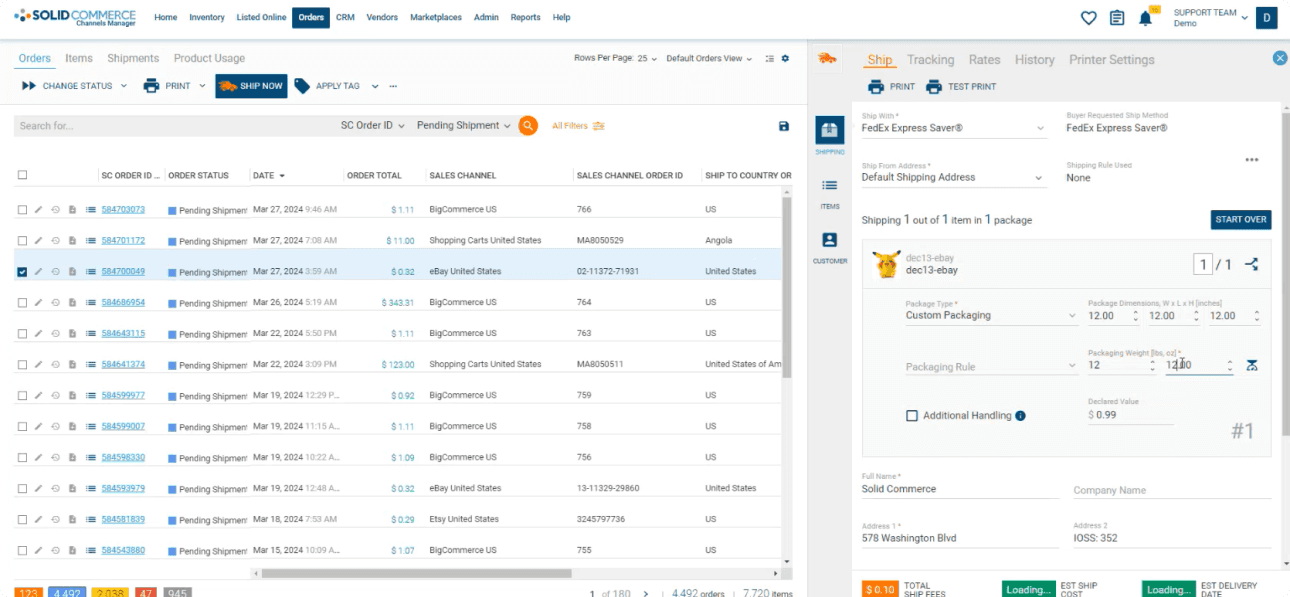
Solid Commerce order management dashboard with a centralized order queue and integrated shipping workspace.
Manage the order queue and complete shipping work from one connected operational workspace.

The Problem

Every sales channel adds another order queue, SLA, shipping promise, fraud profile, label workflow, and tracking requirement. Teams lose time switching between marketplaces, carrier portals, warehouse tools, and spreadsheets just to decide where an order should ship, which service will arrive on time, and what needs attention. As volume grows, manual routing creates split-shipment mistakes, expensive carrier choices, missed cutoffs, packing errors, and late tracking updates that put margins and marketplace performance at risk.
How We Solve It

Solid Commerce brings marketplace, webstore, retail, and wholesale orders into one operational queue. Route each order to the right warehouse, 3PL, or drop-ship vendor using inventory, location, cost, and SLA rules. Validate addresses, compare carrier services and rates, print parcel, marketplace, and LTL labels, and run pick-pack-ship workflows without leaving the order. The platform handles split shipments, work orders, packing documents, and tracking flow-back while governed workflows monitor deadlines, resolve routine exceptions within your rules, and escalate judgment calls to the accountable Orders and Fulfillment team.

One queue from order import to shipment confirmation

Give operations teams a complete view of what is ready to ship, waiting on inventory, approaching an SLA cutoff, or blocked by an exception. Filter and batch orders by channel, warehouse, status, destination, carrier, or business rule, then move from validation to routing, packing, and label creation in the same workflow.

Consolidate marketplace, shopping cart, retail, wholesale, and manual orders

Prioritize by ship-by date, service promise, warehouse, channel, risk, or exception status

Manage split shipments, partial fulfillment, work orders, holds, cancellations, and backorders

Automate carrier selection without losing control

Compare shipping options and apply the rules that matter to your business: delivery promise, shipping cost, package dimensions, destination, margin, or preferred carrier. Use discounted platform rates or your own negotiated accounts, then print labels in batches across parcel, marketplace, and LTL workflows.

Rate-shop UPS, FedEx, USPS, DHL, marketplace labels, and supported freight services

Apply rules-based service selection by weight, destination, SLA, cost, or margin

Print labels, packing slips, and shipping documents while preserving an auditable shipment history

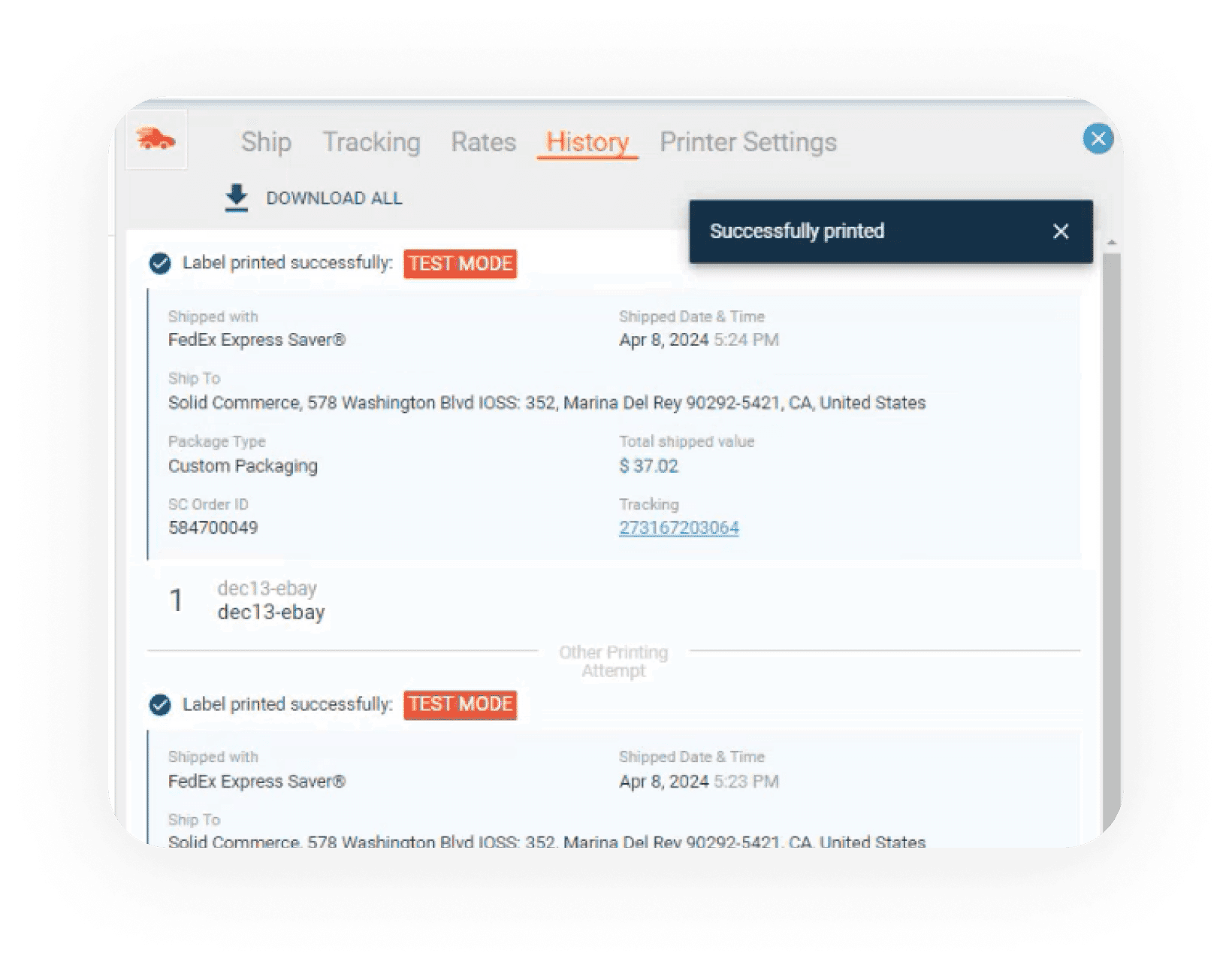
Solid Commerce shipment history showing a successfully printed FedEx label, shipment details, and tracking number.
Label creation, shipment details, costs, and tracking stay attached to the originating order.

Built for warehouse, 3PL, vendor, and hybrid fulfillment

Your fulfillment network does not have to fit one model. Route owned inventory through internal warehouses, send eligible orders to a 3PL, forward drop-ship orders to vendors, or choose dynamically based on availability and customer promise. Every path reports status and tracking back to the same order record.

Run pick-pack-ship workflows with barcode scanning and customizable packing slips

Route by live inventory, warehouse proximity, vendor availability, service level, and business priority

Return shipment status and tracking to every connected sales channel automatically

Key Benefits

One Order Operations Queue

See orders from every channel, warehouse, 3PL, and vendor in one place with the status and context needed to act.

Rules-Based Fulfillment Routing

Route orders by inventory, location, cost, channel promise, vendor availability, and SLA instead of relying on manual decisions.

Shipping Cost Control

Compare services and rates across supported carriers, use platform discounts or your own accounts, and enforce margin-aware shipping rules.

High-Volume Shipping Execution

Batch labels, packing documents, barcode workflows, and shipment history help teams move more orders with fewer clicks and errors.

SLA and Exception Control

Monitor ship-by deadlines, addresses, fraud signals, carrier issues, and fulfillment blockers, resolving routine cases and escalating the rest.

Closed-Loop Tracking

Keep shipment status and tracking synchronized with the originating marketplace or storefront without copy-paste.

Custom Statuses and Returns

Organize orders around your team's workflow and manage return-related work with the order context needed to help customers.

What You Get

Centralized order management across marketplaces, carts, retail, and wholesale

Rules-based routing to warehouses, 3PLs, and drop-ship vendors

Inventory-aware fulfillment-source selection

Address, fraud, and order exception validation

Ship-by SLA monitoring and late-shipment intervention

Multi-carrier rate shopping and service comparison

Discounted platform rates and bring-your-own carrier accounts

UPS, FedEx, USPS, DHL, marketplace, and supported LTL label workflows

Batch label printing across carriers and sales channels

Pick-pack-ship workflows with barcode scanning

Custom packing slips and shipping documents

Split shipments, partial fulfillment, holds, and work orders

Custom order statuses and return management workflows

Carrier and fulfillment exception management

Automatic shipment status and tracking updates to connected channels

Discounted shipping optionsCustom order workflowsAutomatic channel tracking

Frequently asked questions

What does multichannel order management do?

It brings orders from supported marketplaces and webstores into one operational queue. Solid Commerce connects that queue to available inventory, warehouse and vendor routing, shipping labels, and tracking updates so teams can manage fulfillment without working through a separate queue for every channel.

Can I route orders to warehouses, 3PLs, and dropship vendors?

Yes. Solid Commerce supports fulfillment rules using inventory, location, cost, vendor availability, and service requirements. Review your specific channels, carriers, and fulfillment partners during setup, including how split shipments and unavailable stock should be handled.

How does order management connect to inventory?

Available inventory helps determine where an order can be fulfilled. Stock updates and shipment tracking flow through the configured channel connections. Update timing depends on the marketplace, vendor feed, and integration configuration; demonstrate those timings with your own workflows.

Plan your connected commerce workflow

Ready to solve order management & fulfillment?

Create your account, choose your channels, and follow the guided setup.

Share this page

Loading verification challenge...